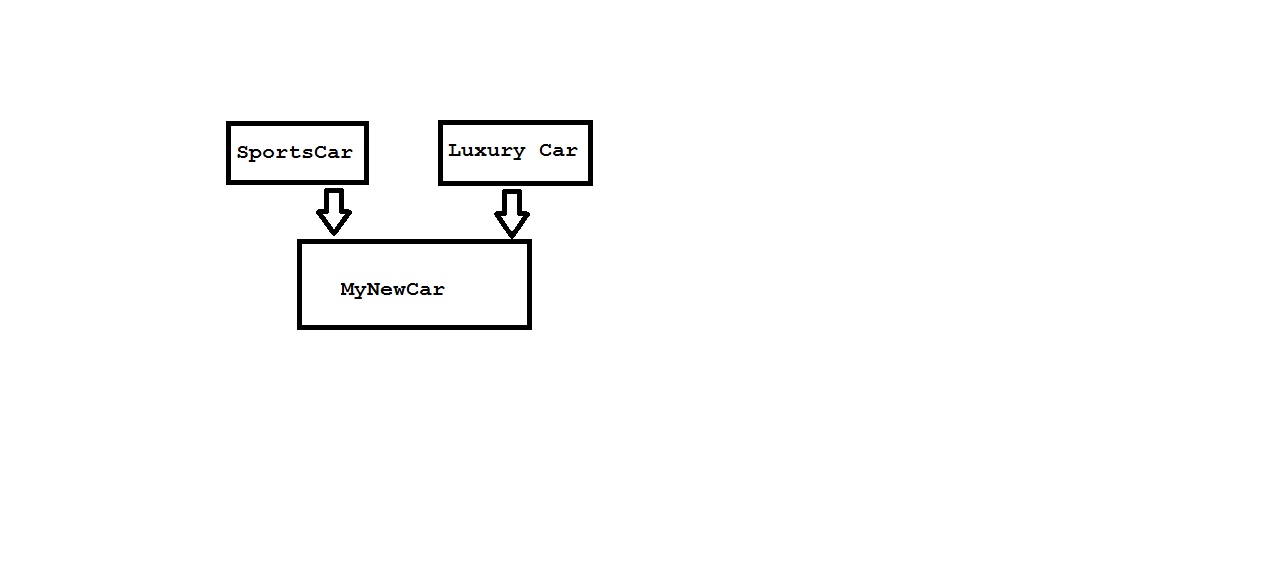
Wednesday, January 12, 2011
What is a interface?

Monday, January 10, 2011
Typecasting and Different Date Formats in Sqlserver
we heared something about typecasting in programming languages.at few times there may be situation to use converting string into integer or integer in to string in sql or Date in to strings
Now CAST or CONVERT are the two methods which can do the needfull
Example1:
So in the similar way we can use cast to convert any data types.
Example 2:
i have a column by name Registartiondate which is of datetime now i want to retrive only date part of the column but not time
Now CAST or CONVERT are the two methods which can do the needfull
Example1:
select (cast(empid as varchar(50))+'-'+e.empname) UID from employee
Result:
1234-Billgates
So in the similar way we can use cast to convert any data types.
Example 2:
i have a column by name Registartiondate which is of datetime now i want to retrive only date part of the column but not time
select convert (varchar,first_op_visit,101) Result1,convert (varchar,first_op_visit,100) Result2,convert (varchar,first_op_visit,102) Result3,convert (varchar,first_op_visit,106) Result4 from patient_profile
Result:
Result1 Result2 Result3 Result4
12/15/2004 Dec 15 2004 12:00AM 2004.12.15 15 Dec 2004
Saturday, January 8, 2011
What is difference between && and &
1)&& is logical operator
true && true is true and everything else is false.
2)& is bitwise and.
(10 & 8) = 8
by using the following manipulation
00000110
&00000100
=00000100
3) true || false =false (logicalm operation)
4)(83 | 15) = 95
00101011
|00000111
=00101111
true && true is true and everything else is false.
2)& is bitwise and.
(10 & 8) = 8
by using the following manipulation
00000110
&00000100
=00000100
3) true || false =false (logicalm operation)
4)(83 | 15) = 95
00101011
|00000111
=00101111
Thursday, January 6, 2011
Wednesday, December 29, 2010
How to create a dll in dotnet?
follow the steps below to know how to create and use the dll
1)open visual studio

2)click on New in file menu and choose project

3)click on visual c# in the left handside from project types and choose class library from templates in right hand side

4)Now you get the screen as follows change the name of class1.cs from solution explorer to Test.cs

5)Now include the code in Test.cs as in the image

6)Now to build options and click on Build Assembly demo

7)once you build your project, go to project folder on your computer go to bin--> debug folder now here
you can see two files ,so the file with extension .dll is the assembly file.

Now we got the dll files ,what to do now?
Let see procedure how to use(consume) dll in any of the applications,i am doing it in a website
8)open visual studio,go to File--->;New--->Website and you get below screen,give a name to your website

9)Now you get a screen as below

10)Go to solution explorer ,right click on the project , choose Add reference from list of options,then in the immediate window choose browse option and move to your debug folder as discussed in step 7,choose the file with .dll extension and click ok

11)Go to your default.cs page ,add a namespace "using AssemblyDemo" at the top

12)Add the following code in your page load event

13)Run your website the final output will be as follows

1)open visual studio

2)click on New in file menu and choose project

3)click on visual c# in the left handside from project types and choose class library from templates in right hand side

4)Now you get the screen as follows change the name of class1.cs from solution explorer to Test.cs

5)Now include the code in Test.cs as in the image

6)Now to build options and click on Build Assembly demo

7)once you build your project, go to project folder on your computer go to bin--> debug folder now here
you can see two files ,so the file with extension .dll is the assembly file.

Now we got the dll files ,what to do now?
Let see procedure how to use(consume) dll in any of the applications,i am doing it in a website
8)open visual studio,go to File--->;New--->Website and you get below screen,give a name to your website


9)Now you get a screen as below

10)Go to solution explorer ,right click on the project , choose Add reference from list of options,then in the immediate window choose browse option and move to your debug folder as discussed in step 7,choose the file with .dll extension and click ok

11)Go to your default.cs page ,add a namespace "using AssemblyDemo" at the top

12)Add the following code in your page load event

13)Run your website the final output will be as follows

Insert multiple rows in one query(Sqlserver)
INSERT INTO pantscolor_t (procode,color,pic)
SELECT '74251', 'Black', '511black.jpg'
UNION ALL
SELECT '74251', 'Charcoal', '511charcoal.jpg'
UNION ALL
SELECT '74251', 'Khaki', '511khaki.jpg'
UNION ALL
SELECT '74251', 'Navy', '511navy.jpg'
UNION ALL
SELECT '74251', 'OD Green', '511odgreen.jpg';
SELECT '74251', 'Black', '511black.jpg'
UNION ALL
SELECT '74251', 'Charcoal', '511charcoal.jpg'
UNION ALL
SELECT '74251', 'Khaki', '511khaki.jpg'
UNION ALL
SELECT '74251', 'Navy', '511navy.jpg'
UNION ALL
SELECT '74251', 'OD Green', '511odgreen.jpg';
Subscribe to:
Posts (Atom)